


Claude brings a different flavor to AI replies. More nuanced. More natural.
If you want that human-like touch in your BizReply responses, you need to hook up Claude’s API.
This guide walks you through it, from Anthropic’s console to your Bizreply dashboard.
Getting Your Claude API Key
Anthropic keeps Claude’s API behind a developer console. It’s not the same as chatting with Claude on their website. Let’s get you access.
Step 1: Visit the Anthropic Console
Fire up your browser. Navigate to console.anthropic.com. That’s your gateway. This console is where developers manage access, billing, and keys.
Step 2: Sign Up for a Console Account
Spot the sign-up option? Click it. Here’s the catch: even if you already pay for Claude Pro (the $20/month chat plan), you still need a separate console account for API access.
The same email works fine. But it’s a different system entirely. Complete registration. Verify your email when it hits your inbox.
Step 3: Fund Your Account
The Claude API runs on prepaid credits. No pay-as-you-go here. Look left. Find “Billing” or “Plans & Billing.” Press that button.
Here, you have to add your credit card details and then purchase credits. Minimum usually starts around $5. That’s your wallet. API calls deduct from this balance automatically, so it’s better to keep it topped up.
Quick note: Bizreply performs best with an active, funded API key. Zero balance means Claude won’t respond.
Step 4: Navigate to API Keys
Back to that left sidebar. Hunt for “API Keys.” Found it? Click. This page shows all active keys.
Step 5: Create Your Key
See a button labeled “Create Key” or “Generate New Key”? Hit it. A dialog pops up asking for a name. Something like “Bizreply-Production” or “Bizreply-Main.” In the future, you will appreciate the clarity when managing multiple keys.
Step 6: Secure It Immediately
Anthropic displays this key exactly once. One display. No replays. The second that key appears on screen, copy it. Paste it into your password manager. Or a secure notes app.
If it’s lost, Anthropic cannot retrieve it. You’ll have to trash that key and generate a completely new one. Security works this way for a reason.
Adding Your Claude Key to Bizreply
Your key is sitting safely in your password manager. Now let’s wire it into Bizreply.
Step 1: Open Bizreply Settings
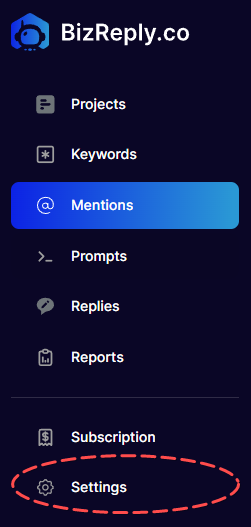
Log into your Bizreply dashboard. Scan the left-hand sidebar. Look for a gear icon or “Settings” from the left-hand bar.
Step 2: Find the Language Model Settings
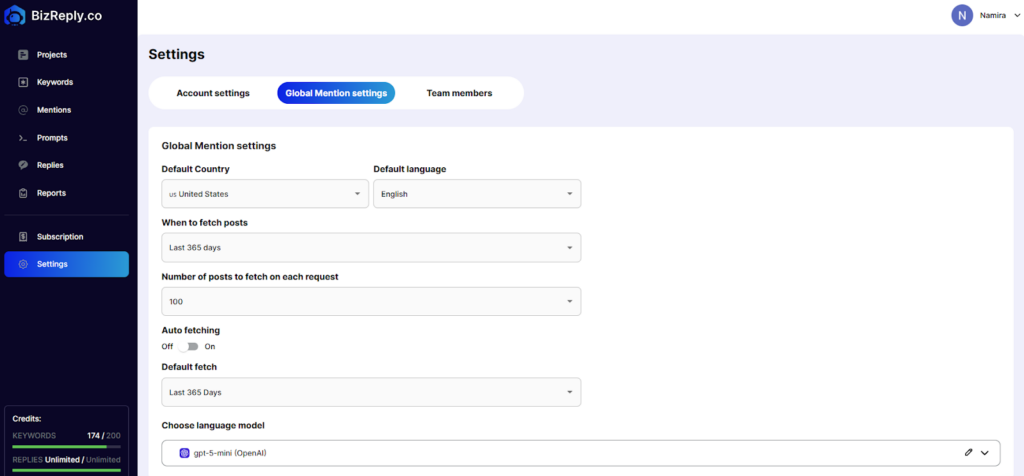
Look for “Global Mention Settings.” Click it. Inside, you’ll spot “Choose language model.” Click the little pen icon next to it.
Step 3: Paste Your API Key
Select the field labeled “AI Key”. Click inside it. Paste your Claude API key carefully. Any accidental spaces will break the connection.
Step 4: Save Your Changes
Hit “Save Changes.” That’s it. Your Claude API key is now locked into Bizreply.
Rest easy: Your API key stays perfectly confidential inside Bizreply. Zero chance of leaks. The system encrypts and protects it.
Troubleshooting Common Issues
Hit a snag? These are the usual culprits.
“Invalid API Key” Error
Copy-paste went wrong. Maybe you grabbed an extra character. Maybe you missed one. Head back to your password manager. Copy the key fresh. Paste it again. No quotes. No spaces. Just the raw string.
Rate Limit Errors
You’re bumping into usage ceilings. This happens with exhausted credit balances. Log in to Anthropic Console. Check your billing. See zeros? Add more credits. Wait a few minutes after topping up. Try again.
Key Not Working in Bizreply
Double-check your Anthropic account status. Confirm you actually have credits available in your balance. Still failing? Reach out to Bizreply support at hello@bizreply.co or ping them on live chat. They’ll sort you out.
You’re Connected
That’s the full journey. You now have Claude whispering suggestions into Bizreply. Expect more nuanced replies. Better context understanding. A more conversational tone.
Frequently Asked Questions
Do I need Claude Pro to use the API?
Absolutely not. Claude Pro and the Claude API are separate products. One doesn’t include the other. You can use the API without ever touching Claude Pro. And vice versa.
How much will this cost me?
Depends on volume. Claude 3.5 Sonnet runs a few cents per thousand tokens processed. Light Bizreply users might spend $5-10 monthly. Power users could hit $30-50. Check Anthropic’s official pricing for exact rates. Start small. Scale as needed.
Can one API key power multiple tools?
Technically yes. Practically no. Separate keys for separate tools means better security and clearer usage tracking. If one key gets exposed, you only rotate that one. The others keep humming along.
What if I lose my key?
It’s permanently gone. Anthropic won’t show it again. Delete the lost key from your console. Generate a replacement. Update that new key in Bizreply. This is why password managers exist.
Why prepaid credits instead of monthly billing?
Anthropic’s choice. Prepaid puts spending control in your hands. You decide the budget upfront. No surprise bills. Run out of credits? The API simply pauses until you add more.
How do I monitor my spending?
Log in to console.anthropic.com. Click “Usage” in the sidebar. Daily breakdowns. Model-specific costs. Per-key tracking. It’s all there. Check weekly to catch unusual patterns.
Is my key safe with Bizreply?
Yes. Encryption at rest. Secure transmission. But treat your key like a password anyway. Don’t email it. Don’t screenshot it and share it. Keep it in your password manager. Rotate it periodically.
Can I switch between Claude and OpenAI in Bizreply?
Typically yes. Bizreply supports multiple providers. Check your language model settings. You can usually toggle between options. Each requires its own API key. Mix and match based on the task.